
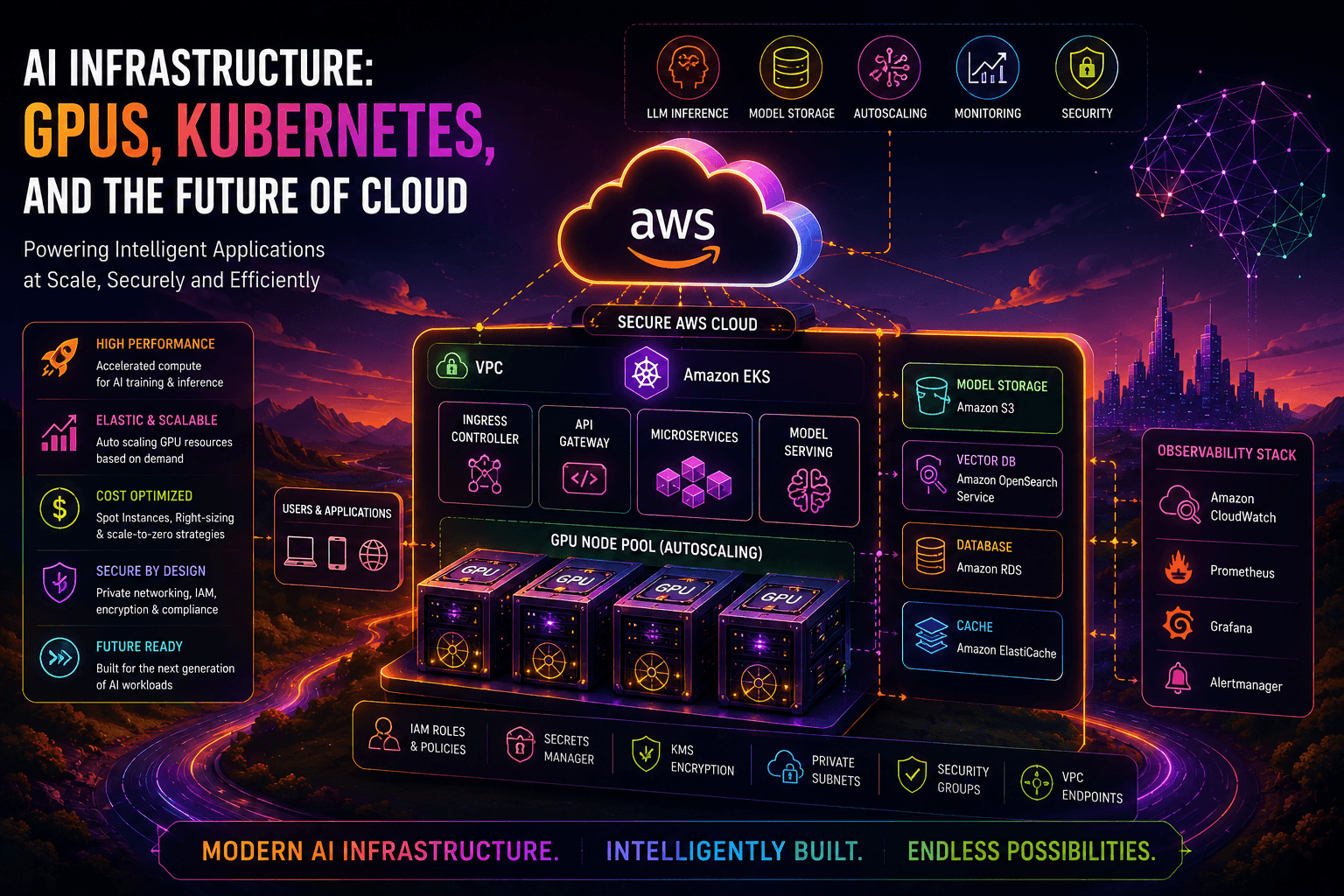
"Explore how modern AI infrastructure uses GPUs, Kubernetes, cloud platforms, and intelligent autoscaling to run AI and LLM workloads at scale. Learn about GPU selection, Amazon EKS, model serving, monitoring, security, cost optimization, and the future of cloud AI infrastructure."
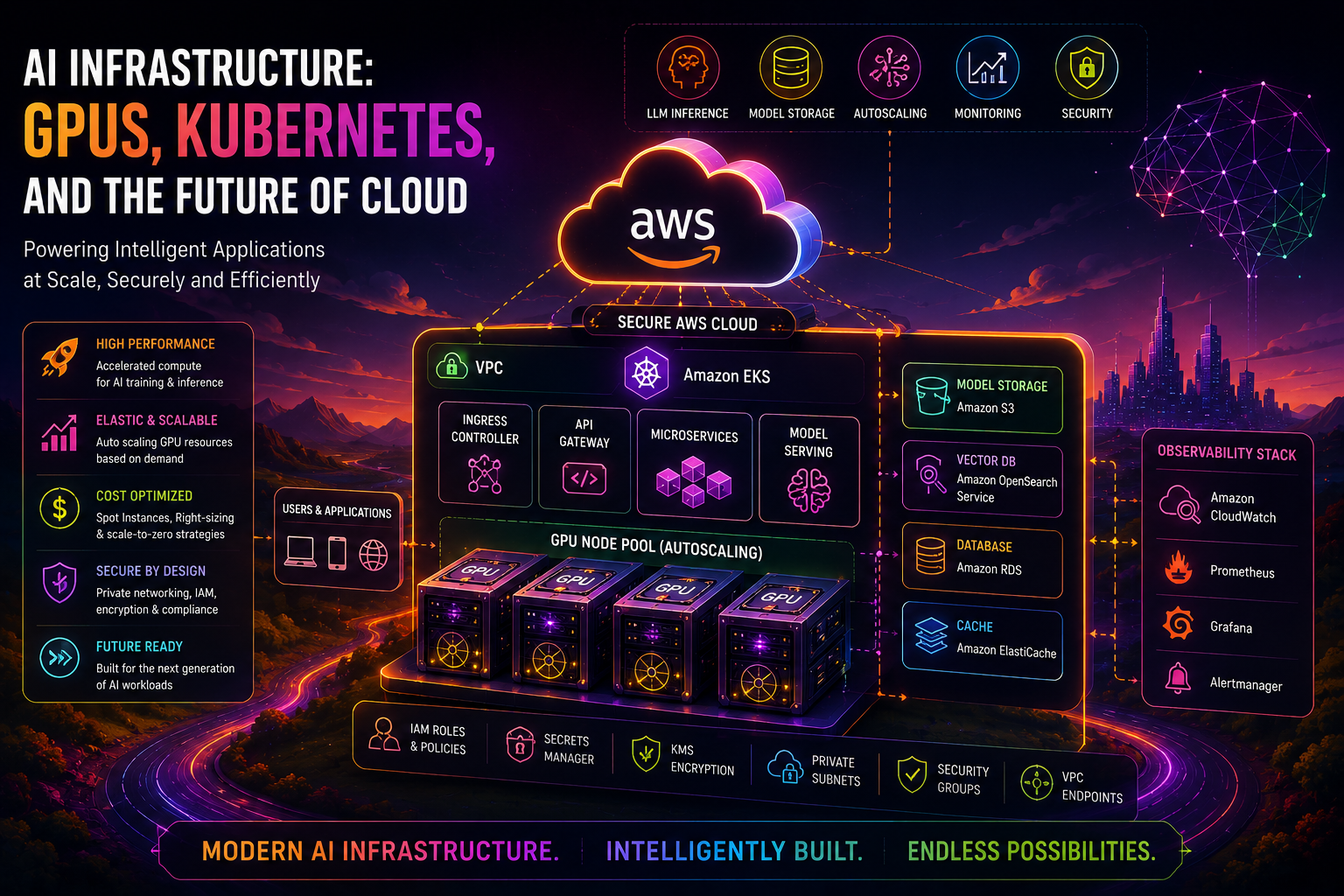
AI Infrastructure: GPUs, Kubernetes, and the Future of Cloud
Artificial intelligence is changing the way organizations design and operate cloud infrastructure.
Traditional cloud applications were primarily designed around CPU-based workloads, databases, web servers, and horizontally scaled application services.
AI workloads introduce a different set of requirements.
Modern AI applications may require:
High-performance GPUs
Large amounts of memory
High-speed networking
Large model storage
Kubernetes orchestration
Dynamic GPU scaling
Specialized inference servers
Model monitoring
High-throughput data pipelines
Cost optimization
For organizations building AI applications, infrastructure is becoming just as important as the model itself.
A production AI platform needs to answer questions such as:
Which GPU should we use?

How many GPUs do we need?

Where should the model run?

How do we scale GPU capacity?

How do we deploy models reliably?

How do we monitor GPU utilization?

How do we control infrastructure costs?

How do we secure AI workloads?
This is where GPU infrastructure, Kubernetes, and cloud platforms become critical.
What Is AI Infrastructure?
AI infrastructure is the combination of hardware, software, networking, storage, orchestration, and cloud services required to build and operate AI workloads.
A simplified architecture looks like:
                         AI Application
                               |
                               v
                        API / Gateway
                               |
                               v
                         AI Platform
                               |
                +--------------+--------------+
                |                             |
                v                             v
           CPU Services                 GPU Services
                                              |
                                              v
                                         AI Model
                                              |
                                              v
                                      Model Response
A production AI platform can contain:
GPU Compute
Kubernetes
Container Registry
Object Storage
Databases
Networking
Load Balancers
Monitoring
Security
CI/CD
Infrastructure as Code
These components work together to create a platform capable of running training, fine-tuning, and inference workloads.
Why GPUs Are Important for AI
Traditional CPUs are designed to handle a relatively small number of complex operations efficiently.
AI workloads involve massive amounts of parallel mathematical operations.
GPUs are designed to perform many operations simultaneously.
A simplified comparison is:
CPU

Core → Operation
Core → Operation
Core → Operation
Core → Operation


GPU

Core → Operation
Core → Operation
Core → Operation
Core → Operation
Core → Operation
Core → Operation
Core → Operation
Core → Operation
...
Thousands of parallel operations
This parallel processing capability makes GPUs extremely useful for machine learning and AI workloads.
GPUs are commonly used for:
Model training
Fine-tuning
LLM inference
Computer vision
Speech processing
Recommendation systems
Generative AI
Scientific computing
Training vs Inference
AI infrastructure requirements depend heavily on whether the workload is training or inference.
Model Training
Training requires processing large datasets and updating model parameters.
Dataset
   |
   v
Training Pipeline
   |
   v
GPU Cluster
   |
   v
Model
   |
   v
Checkpoint
Training workloads can require:
Multiple GPUs
High GPU utilization
Large datasets
High-speed storage
High-speed networking
Distributed computing
Model Inference
Inference uses an already trained model to generate predictions or responses.
User Request
     |
     v
API
     |
     v
Inference Server
     |
     v
GPU
     |
     v
Model Response
Inference workloads are generally more sensitive to:
Latency
Request volume
GPU memory
Throughput
Availability
Autoscaling
AWS describes inference on EKS as including workloads such as LLM text/code generation, image generation, speech, and video workloads.
The AI Infrastructure Stack
A modern cloud AI platform can be divided into multiple layers.
+--------------------------------------+
|             Applications             |
+--------------------------------------+
|          AI / LLM Services           |
+--------------------------------------+
|       Model Serving / Inference      |
+--------------------------------------+
|             Kubernetes               |
+--------------------------------------+
|          GPU / Accelerator           |
+--------------------------------------+
|       Compute / Networking           |
+--------------------------------------+
|       Storage / Data Platform        |
+--------------------------------------+
|          Cloud Infrastructure        |
+--------------------------------------+
Each layer solves a different infrastructure problem.
Layer 1: Cloud Infrastructure
The foundation is the cloud platform.
For example, an AWS AI environment may use:
Amazon VPC
Amazon EC2
Amazon EKS
Amazon S3
Elastic Load Balancing
IAM
CloudWatch
KMS
Secrets Manager
The cloud provides the underlying compute, networking, storage, and security capabilities required by the AI platform.
Layer 2: GPU Infrastructure
GPU-enabled compute provides the acceleration required by AI workloads.
The appropriate GPU depends on:
Model size
GPU memory requirements
Inference latency
Training requirements
Batch size
Throughput
Framework compatibility
Cost
AWS provides multiple accelerator options, including NVIDIA GPU-based EC2 instances and purpose-built AWS accelerators such as Trainium and Inferentia.
The correct choice depends on the workload rather than simply selecting the most powerful hardware.
GPU Memory Matters
One of the biggest considerations when deploying an LLM is GPU memory.
A model must fit within available GPU memory along with other runtime requirements.
A simplified model is:
GPU Memory
    |
    +---- Model Weights
    |
    +---- KV Cache
    |
    +---- Activations
    |
    +---- Runtime Overhead
For inference workloads, the model may also need significant memory for the KV cache.
This means selecting a GPU only based on compute performance can result in a deployment that does not work efficiently.
AWS recommends considering GPU characteristics and GPU memory when scheduling AI/ML workloads on EKS.
GPU Selection Strategy
Before choosing a GPU, evaluate:
Model Size
     ↓
Required GPU Memory
     ↓
Expected Traffic
     ↓
Latency Requirement
     ↓
GPU Type
     ↓
Instance Type
     ↓
Cost
For example:
Small Model
   ↓
Single GPU
   ↓
Lower Cost


Large Model
   ↓
Multiple GPUs
   ↓
Tensor Parallelism
   ↓
Higher Cost
The goal should be right-sized GPU infrastructure, not simply maximum GPU power.
What Is Kubernetes?
Kubernetes is a container orchestration platform used to deploy, manage, and scale containerized workloads.
For AI infrastructure, Kubernetes can provide:
Workload scheduling
GPU allocation
Service discovery
Scaling
Rolling deployments
Health checks
Resource management
Workload isolation
A simplified architecture is:
                    Kubernetes Cluster
                           |
            +--------------+--------------+
            |                             |
            v                             v
        CPU Nodes                     GPU Nodes
            |                             |
            v                             v
      Applications                  AI Workloads
                                          |
                                          v
                                        LLM
Why Kubernetes Is Useful for AI
AI platforms often contain many different workloads.
For example:
Model Training
Model Fine-Tuning
LLM Inference
Embedding Service
Vector Search
API Services
Monitoring
Data Processing
Running all these services manually on individual virtual machines becomes difficult to manage.
Kubernetes provides a consistent platform for deploying and managing these workloads.
Amazon EKS for AI Workloads
Amazon Elastic Kubernetes Service (EKS) provides managed Kubernetes on AWS.
AWS currently provides specific guidance for creating EKS clusters for AI/ML workloads, including GPU-enabled nodes, dynamic provisioning, monitoring with Prometheus/Grafana, and S3 storage for model weights.
A typical architecture is:
                       AWS Cloud
                           |
                           v
                    Amazon EKS
                           |
             +-------------+-------------+
             |                           |
             v                           v
        CPU Node Pool               GPU Node Pool
             |                           |
             v                           v
       Application Pods            AI/LLM Pods
                                         |
                                         v
                                   Model Server
                                         |
                                         v
                                       GPU
GPU Scheduling in Kubernetes
Kubernetes needs to understand which nodes have GPUs.
A workload can request GPU resources.
For example:
resources:
  limits:
    nvidia.com/gpu: 1
This tells Kubernetes that the workload requires one NVIDIA GPU.
AWS recommends using Kubernetes scheduling constraints such as node selectors or affinity together with GPU resource requests to ensure workloads are placed on compatible GPU nodes.
A simplified example is:
apiVersion: v1
kind: Pod

metadata:
  name: llm-gpu-pod

spec:
  containers:
    - name: llm
      image: llm-server:latest

      resources:
        limits:
          nvidia.com/gpu: 1
The exact configuration depends on the EKS architecture and GPU management approach being used.
GPU Drivers and Device Plugins
Kubernetes needs mechanisms to expose GPUs to workloads.
The NVIDIA Kubernetes device plugin is commonly used for this purpose.
The flow looks like:
GPU Hardware
     |
     v
GPU Driver
     |
     v
NVIDIA Device Plugin
     |
     v
Kubernetes
     |
     v
AI Pod
Current EKS guidance supports NVIDIA GPU management through the NVIDIA device plugin and, for newer Kubernetes deployments, the NVIDIA DRA driver for more flexible GPU allocation.
GPU Sharing
Not every AI workload requires an entire physical GPU.
GPU sharing can improve utilization.
Two important approaches are:
MIGand:
Time-SlicingMulti-Instance GPU
MIG partitions supported GPUs into isolated GPU instances.
Physical GPU
     |
     +---- GPU Instance 1
     |
     +---- GPU Instance 2
     |
     +---- GPU Instance 3
MIG provides hardware-level memory and compute isolation between instances.
AWS documentation notes that MIG is useful for multi-tenant inference and workloads requiring predictable or hardware-isolated GPU resources.
GPU Time-Slicing
Time-slicing allows multiple workloads to share a physical GPU through software scheduling.
             Physical GPU
                  |
        +---------+---------+
        |         |         |
       Pod 1     Pod 2     Pod 3
This can be useful when workloads do not continuously consume the GPU.
However, time-slicing does not provide the same hardware isolation as MIG.
Dynamic GPU Provisioning
One of the biggest challenges with GPU infrastructure is cost.
A GPU node that sits idle still consumes infrastructure resources.
Instead of permanently running GPU nodes:
24/7 GPU Nodes
       |
       v
High Cost
use dynamic provisioning:
AI Request
    |
    v
Pod Pending
    |
    v
GPU Capacity Required
    |
    v
GPU Node Provisioned
    |
    v
Workload Runs
    |
    v
Workload Scales Down
    |
    v
GPU Capacity Reduced
AWS documents EKS patterns where Karpenter dynamically provisions GPU instances based on pending workloads.
Karpenter and AI Workloads
Karpenter is a Kubernetes node provisioning and scaling technology that can dynamically provision compute capacity based on workload requirements.
For AI workloads, it can help select appropriate GPU capacity.
For example:
Pod Requires:
GPU = 1
Memory = 32 GB

        ↓

Kubernetes Scheduler

        ↓

Karpenter

        ↓

Select Compatible GPU Instance

        ↓

Launch GPU Node

        ↓

Schedule Pod
This reduces the need to manually maintain fixed GPU node groups.
EKS Auto Mode
Amazon EKS Auto Mode can simplify infrastructure management for AI/ML workloads.
AWS documentation states that EKS Auto Mode can manage accelerator-related components and can automatically provision infrastructure for GPU workloads. It also supports scaling to zero for workloads where no GPU capacity is required.
A simplified model is:
Developer
    |
    v
Kubernetes Workload
    |
    v
EKS Auto Mode
    |
    +---- Compute
    +---- Networking
    +---- Storage
    +---- Load Balancing
    +---- GPU Infrastructure
This can reduce operational overhead for teams that want Kubernetes without managing every infrastructure component manually.
Model Serving
Once GPU infrastructure is available, the next challenge is serving the model.
A common architecture is:
User
 |
 v
Load Balancer
 |
 v
Kubernetes Service
 |
 v
Model Server
 |
 v
GPU
 |
 v
LLM
Modern model-serving frameworks can expose APIs that applications use to send inference requests.
For example:
Application
     |
     v
POST /v1/chat/completions
     |
     v
Model Server
     |
     v
LLM
AWS's current EKS inference guidance includes model servers such as vLLM and describes exposing inference services through Kubernetes Services and production load balancers.
Model Storage
Large model files need reliable storage.
Amazon S3 is commonly used for storing model weights.
The architecture can be:
Model Registry
      |
      v
Amazon S3
      |
      v
EKS Pod
      |
      v
GPU Memory
      |
      v
Model Server
AWS's current EKS AI/ML setup guidance includes an S3 bucket for model weights and workload identity that allows EKS workloads to access the bucket.
Reducing Model Startup Time
Large models can take significant time to download and load.
This becomes a problem when GPU nodes are dynamically provisioned.
A simplified startup sequence is:
GPU Node Starts
      |
      v
Container Download
      |
      v
Model Download
      |
      v
Model Load
      |
      v
GPU Initialization
      |
      v
Ready for Traffic
Reducing each step improves startup time.
Current EKS guidance highlights technologies such as SOCI for faster container image pulls and model streaming from S3 to reduce cold-start time.
Scaling AI Inference
Inference traffic can change dramatically.
For example:
Night

Low Traffic
    ↓
2 GPU Replicas


Day

High Traffic
    ↓
10 GPU Replicas
Kubernetes can scale workloads based on demand.
A simplified architecture is:
Traffic
   |
   v
Inference Service
   |
   +---- Replica 1
   |
   +---- Replica 2
   |
   +---- Replica 3
   |
   +---- Replica N
AWS describes inference autoscaling on EKS as a two-stage process where workload replicas scale based on demand and GPU node capacity is provisioned as needed.
Important AI Inference Metrics
Traditional CPU and memory metrics are not enough for AI workloads.
Important metrics include:
GPU Utilization
GPU Memory
Request Rate
Request Latency
Time to First Token
Time Per Output Token
Token Throughput
KV Cache Utilization
Queue Depth
Error Rate
AWS specifically identifies metrics such as Time to First Token (TTFT), Time Per Output Token (TPOT), end-to-end latency, and KV cache utilization as important inference metrics.
Monitoring GPU Infrastructure
A production AI platform should monitor both Kubernetes and GPU metrics.
A typical architecture is:
GPU Nodes
    |
    v
NVIDIA DCGM Exporter
    |
    v
Prometheus
    |
    v
Amazon Managed Service for Prometheus
    |
    v
Grafana
AWS's current EKS AI/ML architecture uses Prometheus, Grafana, and NVIDIA DCGM Exporter to collect and visualize GPU-specific metrics.
Metrics can include:
GPU utilization
GPU memory
Temperature
Power consumption
NVLink bandwidth
Tensor activity
AI Infrastructure Security
AI infrastructure must be protected like any other production platform.
Important security controls include:
IAM
VPC
Security Groups
Private Subnets
KMS
Secrets Manager
Network Policies
Kubernetes RBAC
Container Scanning
Image Security
Audit Logging
A secure architecture looks like:
Internet
    |
    v
WAF
    |
    v
Load Balancer
    |
    v
Private Application
    |
    v
Private GPU Nodes
    |
    v
Protected Model Storage
GPU nodes should not be exposed directly to the public internet unless there is a specific requirement.
Kubernetes Security for AI
Kubernetes introduces additional security requirements.
Use:
RBAC
Namespace isolation
Network policies
Pod security controls
Resource limits
Image scanning
Secret management
Workload identity
For example:
AI Team
   |
   v
AI Namespace
   |
   +---- Model Server
   +---- Embedding Service
   +---- Monitoring
Teams should only receive the permissions they actually require.
Container Security
AI applications commonly use large container images containing:
CUDA
Python
ML frameworks
Model-serving libraries
System libraries
Large images increase the attack surface and can also increase startup time.
A secure pipeline is:
Source Code
    |
    v
Docker Build
    |
    v
Dependency Scan
    |
    v
Container Scan
    |
    v
Registry
    |
    v
Deployment
Container images should be regularly updated and scanned for vulnerabilities.
Infrastructure as Code
AI infrastructure can become complex very quickly.
Terraform can be used to provision:
VPC
EKS
GPU NodePools
IAM
S3
Load Balancers
Security Groups
Monitoring
A simplified workflow is:
Terraform
    |
    v
terraform plan
    |
    v
Review
    |
    v
terraform apply
    |
    v
AWS Infrastructure
AWS provides current Terraform guidance for creating EKS environments for AI/ML workloads, including GPU infrastructure, monitoring, and S3 model storage.
CI/CD for AI Infrastructure
AI applications should use the same disciplined deployment practices as other production applications.
A typical pipeline is:
GitHub
   |
   v
CI/CD
   |
   +---- Unit Tests
   |
   +---- Security Scan
   |
   +---- Docker Build
   |
   +---- Image Scan
   |
   v
Container Registry
   |
   v
EKS
   |
   v
GPU Inference
This makes model-serving infrastructure reproducible and easier to manage.
GitOps for AI Platforms
Larger organizations can use GitOps to manage Kubernetes environments.
The basic model is:
Developer
    |
    v
Git Repository
    |
    v
GitOps Controller
    |
    v
Kubernetes
    |
    v
AI Workloads
Changes to Kubernetes manifests can be reviewed through Git before they are applied to production.
This provides:
Version control
Auditability
Reproducibility
Easier rollback
Controlled deployments
AI Infrastructure Cost Optimization
GPU infrastructure can become one of the largest components of a cloud AI bill.
Cost optimization should therefore be designed into the architecture.
Key strategies include:
Right-Sized GPUs
       +
Dynamic Scaling
       +
Spot Capacity
       +
Scale to Zero
       +
GPU Sharing
       +
Model Optimization
AWS's EKS AI/ML guidance includes dynamic GPU provisioning, Spot capacity with On-Demand fallback, and scale-to-zero patterns for reducing unnecessary GPU costs.
GPU Utilization Is Critical
Consider two scenarios.
Scenario A
GPU Capacity = 100%

Cost = High
Performance = High
This may be efficient.
Scenario B
GPU Capacity = 10%

Cost = High
Performance = Low
This is a sign that infrastructure may be over-provisioned.
Monitoring utilization can help identify opportunities to:
Scale down
Use smaller GPUs
Share GPUs
Use different instance types
Optimize batching
Improve model serving
Spot Instances for AI
Some AI workloads can tolerate interruptions.
Examples include:
Training experiments
Batch inference
Non-critical processing
Development environments
These workloads may be candidates for Spot capacity.
A common strategy is:
Spot GPU
    |
    X Interrupted
    |
    v
On-Demand Fallback
For production inference, the acceptable capacity strategy depends on availability and latency requirements.
Model Optimization
Infrastructure optimization is not only about choosing cheaper GPUs.
The model itself can be optimized.
Common techniques include:
Quantization
Model Compression
Batching
Caching
Distillation
Tensor Parallelism
Efficient KV Cache Management
For example:
Large Model
     |
     v
Quantization
     |
     v
Lower Memory Requirement
     |
     v
Smaller GPU Requirement
     |
     v
Lower Cost
Tensor Parallelism
Large models may not fit into a single GPU.
Tensor parallelism can distribute model computation across multiple GPUs.
                Large Model
                    |
        +-----------+-----------+
        |                       |
        v                       v
      GPU 1                   GPU 2
        |                       |
        +-----------+-----------+
                    |
                    v
                 Output
This can allow larger models to run across multiple GPUs.
However, multi-GPU architectures also introduce networking and synchronization requirements.
The Future of AI Infrastructure
The future of cloud infrastructure is moving toward more specialized and automated AI platforms.
Instead of manually managing:
GPU Nodes
Drivers
Scaling
Monitoring
Networking
Model Deployment
platforms are increasingly automating these operations.
The future architecture may look like:
AI Application
      |
      v
AI Platform
      |
      +---- Model Selection
      |
      +---- GPU Selection
      |
      +---- Automatic Scaling
      |
      +---- Model Deployment
      |
      +---- Monitoring
      |
      +---- Cost Optimization
This means developers can focus more on AI applications while the platform handles infrastructure complexity.
GPUs vs Specialized AI Accelerators
GPUs are not the only option for AI workloads.
Cloud providers also offer specialized accelerators.
For example, AWS provides:
NVIDIA GPUs
AWS Trainium
AWS Inferentia
The choice depends on:
Framework Support
Model Compatibility
Performance
Memory
Cost
Availability
Operational Requirements
The future of AI infrastructure will likely include a mixture of general-purpose GPUs and specialized accelerators.
The Rise of AI-Native Cloud Platforms
Traditional cloud platforms were designed around:
CPU
Memory
Storage
Networking
AI-native infrastructure adds:
GPU
Accelerators
Model Serving
Vector Search
Inference
Token Processing
Model Storage
AI Observability
This creates a new cloud infrastructure layer.
Traditional Cloud
        +
AI Infrastructure
        =
AI-Native Cloud Platform
AI Infrastructure Architecture of the Future
A future enterprise AI platform could look like:
                         Users
                           |
                           v
                    Global Traffic
                           |
                           v
                     WAF / API
                           |
                           v
                  AI Application Layer
                           |
                +----------+----------+
                |                     |
                v                     v
           RAG Services          AI Agents
                |                     |
                v                     v
         Vector Database        Tool Services
                |                     |
                +----------+----------+
                           |
                           v
                    Model Gateway
                           |
                +----------+----------+
                |                     |
                v                     v
          GPU Inference        Specialized AI
                |              Accelerators
                v                     |
              EKS <-------------------+
                |
       +--------+--------+
       |        |        |
       v        v        v
     S3     Monitoring  Security
   Models    Stack       Layer
This type of platform can support multiple AI models, teams, applications, and workloads.
Multi-Model Serving
Enterprises may not use a single model.
Instead, they may deploy:
Model A → Customer Support
Model B → Document Processing
Model C → Coding Assistant
Model D → Internal Search
Model E → Analytics
A model gateway can route requests to the appropriate model.
                     Model Gateway
                          |
          +---------------+---------------+
          |               |               |
          v               v               v
       Model A          Model B          Model C
This approach can improve infrastructure utilization and simplify application integration.
AI Infrastructure Observability
AI observability will become increasingly important.
Traditional monitoring asks:
Is the server healthy?AI infrastructure also needs to ask:
Is the model healthy?

Is GPU utilization efficient?

How many tokens are being processed?

What is the latency?

How much does each request cost?

Is the model producing errors?

Is the KV cache full?

Are requests waiting in a queue?
This creates a broader observability model:
Infrastructure
      +
Kubernetes
      +
GPU
      +
Model
      +
Application
      =
AI Observability
AI Infrastructure and FinOps
Cloud cost management will become increasingly important as organizations deploy more AI workloads.
A future FinOps dashboard may show:
GPU Cost
Model Cost
Tokens Processed
Cost / Request
Cost / Customer
GPU Utilization
Idle Capacity
Spot Savings
This allows organizations to understand the real economics of AI workloads.
Common AI Infrastructure Mistakes
1. Choosing the Most Powerful GPU
The largest GPU is not always the best GPU.
Choose based on workload requirements.
2. Running GPUs 24/7
Idle GPU capacity can significantly increase cloud costs.
Use dynamic scaling where appropriate.
3. Ignoring GPU Memory
A model may require more memory than the selected GPU provides.
Always evaluate model memory requirements.
4. Running AI Workloads Without Kubernetes Governance
Without appropriate policies, GPU workloads can consume resources unpredictably.
Use:
Resource requests
Resource limits
Namespaces
RBAC
Scheduling rules
Autoscaling
5. Monitoring Only CPU and Memory
GPU utilization and AI-specific metrics are equally important.
6. Ignoring Model Startup Time
Large model downloads can create significant cold-start delays.
Use optimized container images and efficient model storage strategies.
7. Treating Security as an Afterthought
AI infrastructure handles valuable models and potentially sensitive data.
Security must be built into every layer.
Recommended AI Infrastructure Stack
A practical AWS AI infrastructure stack could look like:
Cloud
 └── AWS

Compute
 ├── EC2 GPU Instances
 ├── AWS Trainium
 └── AWS Inferentia

Orchestration
 └── Amazon EKS

Scaling
 ├── Karpenter
 └── EKS Auto Mode

Storage
 └── Amazon S3

Networking
 ├── VPC
 ├── ALB
 └── Security Groups

Security
 ├── IAM
 ├── KMS
 ├── Secrets Manager
 └── WAF

Monitoring
 ├── CloudWatch
 ├── Prometheus
 ├── Grafana
 └── NVIDIA DCGM Exporter

Infrastructure as Code
 └── Terraform

CI/CD
 ├── Jenkins
 └── GitHub
Current AWS documentation describes EKS AI/ML architectures combining GPU nodes, Karpenter or EKS Auto Mode, S3 model storage, Prometheus/Grafana, and GPU-specific monitoring.
Production AI Infrastructure Checklist
Before deploying an AI platform into production:
Select the correct GPU or accelerator
Validate GPU memory requirements
Validate CUDA/framework compatibility
Create appropriate VPC architecture
Keep GPU infrastructure private where possible
Deploy Kubernetes/EKS
Configure GPU drivers and device management
Configure GPU scheduling
Define CPU, memory, and GPU resource requests
Configure autoscaling
Store model weights securely
Configure model-serving infrastructure
Configure load balancing
Implement IAM least privilege
Secure Kubernetes RBAC
Scan container images
Encrypt sensitive data
Configure monitoring
Monitor GPU utilization
Monitor inference latency
Monitor token throughput
Monitor KV cache utilization
Configure logging
Implement CI/CD
Manage infrastructure with Terraform
Monitor GPU costs
Consider Spot capacity where appropriate
Implement backup and recovery strategies
Test failure scenarios
Real-World AI Platform Example
Consider an enterprise AI assistant.
The architecture could be:
                         Employees
                             |
                             v
                       Web Application
                             |
                             v
                       API Gateway
                             |
                             v
                      Application Pods
                             |
                             v
                        RAG Service
                         /       \
                        /         \
                       v           v
                Vector Database   S3
                       |
                       v
                  Model Gateway
                       |
             +---------+---------+
             |                   |
             v                   v
        LLM Model A          LLM Model B
             |                   |
             +---------+---------+
                       |
                       v
                  GPU Cluster
                       |
                       v
                     EKS
                       |
             +---------+---------+
             |                   |
             v                   v
        Prometheus            CloudWatch
             |
             v
           Grafana
The platform can automatically scale GPU capacity based on demand while keeping model workloads isolated and observable.
What the Future Looks Like
AI infrastructure is moving toward a model where infrastructure becomes increasingly automated.
Instead of engineers manually deciding:
Which GPU?
How many nodes?
When should nodes scale?
Which model server?
How should workloads be scheduled?
AI platforms can increasingly automate these decisions.
The future may look like:
Developer
    |
    v
"I need to deploy this model."
    |
    v
AI Platform
    |
    +---- Select Compute
    |
    +---- Select GPU
    |
    +---- Provision Infrastructure
    |
    +---- Deploy Model
    |
    +---- Configure Scaling
    |
    +---- Configure Monitoring
    |
    +---- Optimize Cost
    |
    v
Production AI Service
This represents a shift from infrastructure management toward AI platform engineering.
Final Thoughts
The future of cloud computing is increasingly connected to AI infrastructure.
GPUs provide the computational power.
Kubernetes provides orchestration.
Cloud platforms provide scalable infrastructure.
Object storage provides model storage.
Monitoring provides visibility.
Autoscaling provides elasticity.
Security protects the entire platform.
And Infrastructure as Code makes the environment reproducible.
The modern AI infrastructure stack can therefore be summarized as:
GPU
 +
Kubernetes
 +
Cloud
 +
Model Serving
 +
Autoscaling
 +
Observability
 +
Security
 +
FinOps
 =
Production AI Platform
Organizations that build this foundation correctly can deploy AI workloads faster, scale them more efficiently, and operate them more reliably.
The future is not simply about having larger AI models.
It is about building smarter, more efficient, secure, and automated infrastructure capable of running those models at scale.
FAQ
Why are GPUs important for AI?
GPUs provide highly parallel computing capabilities that are well suited to the mathematical operations used by machine learning and AI workloads.
Is Kubernetes useful for AI workloads?
Yes. Kubernetes can manage containerized AI workloads, schedule GPU resources, scale inference services, and provide a consistent deployment platform.
Why use Amazon EKS for AI?
Amazon EKS combines Kubernetes orchestration with AWS infrastructure and supports GPU-based inference, dynamic scaling, monitoring, and integration with AWS services such as S3.
Can Kubernetes automatically provision GPU nodes?
Yes. Technologies such as Karpenter can dynamically provision compatible GPU capacity based on workload requirements. EKS Auto Mode also provides automated infrastructure management for supported workloads.
How do I reduce GPU costs?
Use right-sized GPU instances, dynamic scaling, GPU sharing where appropriate, Spot capacity for interruptible workloads, model optimization, and scale-to-zero strategies where the workload permits.
What is GPU sharing?
GPU sharing allows multiple workloads to use the same physical GPU. Common approaches include NVIDIA MIG and time-slicing. MIG provides hardware-level isolation, while time-slicing uses software-based sharing.
What should I monitor in an AI platform?
Monitor GPU utilization, GPU memory, inference latency, request rate, token throughput, Time to First Token, Time Per Output Token, KV cache utilization, errors, and infrastructure health.
Should model weights be stored in S3?
S3 can provide durable object storage for model weights and can be integrated with EKS workloads using appropriate workload identity and IAM controls.
What is the future of AI infrastructure?
AI infrastructure is moving toward automated GPU provisioning, intelligent scheduling, model-aware autoscaling, specialized accelerators, AI observability, and platform-level automation.
Conclusion
AI infrastructure is becoming the foundation of modern cloud computing.
GPUs provide the compute power required by AI.
Kubernetes provides the orchestration layer.
Cloud platforms provide elasticity.
Autoscaling manages changing workloads.
Monitoring provides operational visibility.
Security protects models and data.
FinOps keeps infrastructure economically sustainable.
Together, these technologies create the foundation for the next generation of cloud applications.
The organizations that succeed with AI will not only build better models.
They will build better infrastructure for running those models. writing your amazing blog post here...