
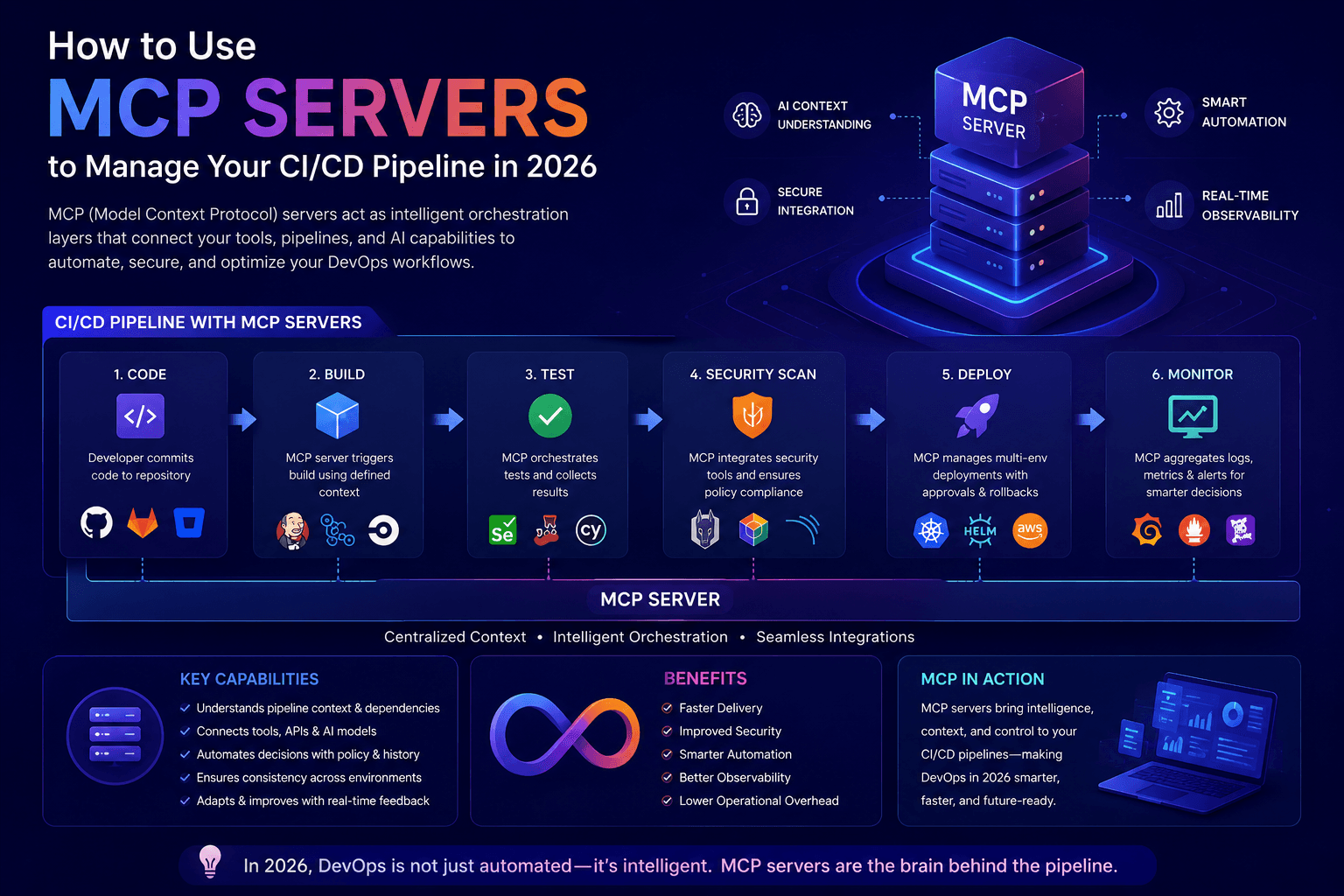
"Discover how Model Context Protocol (MCP) servers let AI assistants trigger builds, monitor deployments, and manage CI/CD pipelines through natural language — with a practical implementation guide."
MCP Server for CI/CD Pipeline Management | 2026 Guide
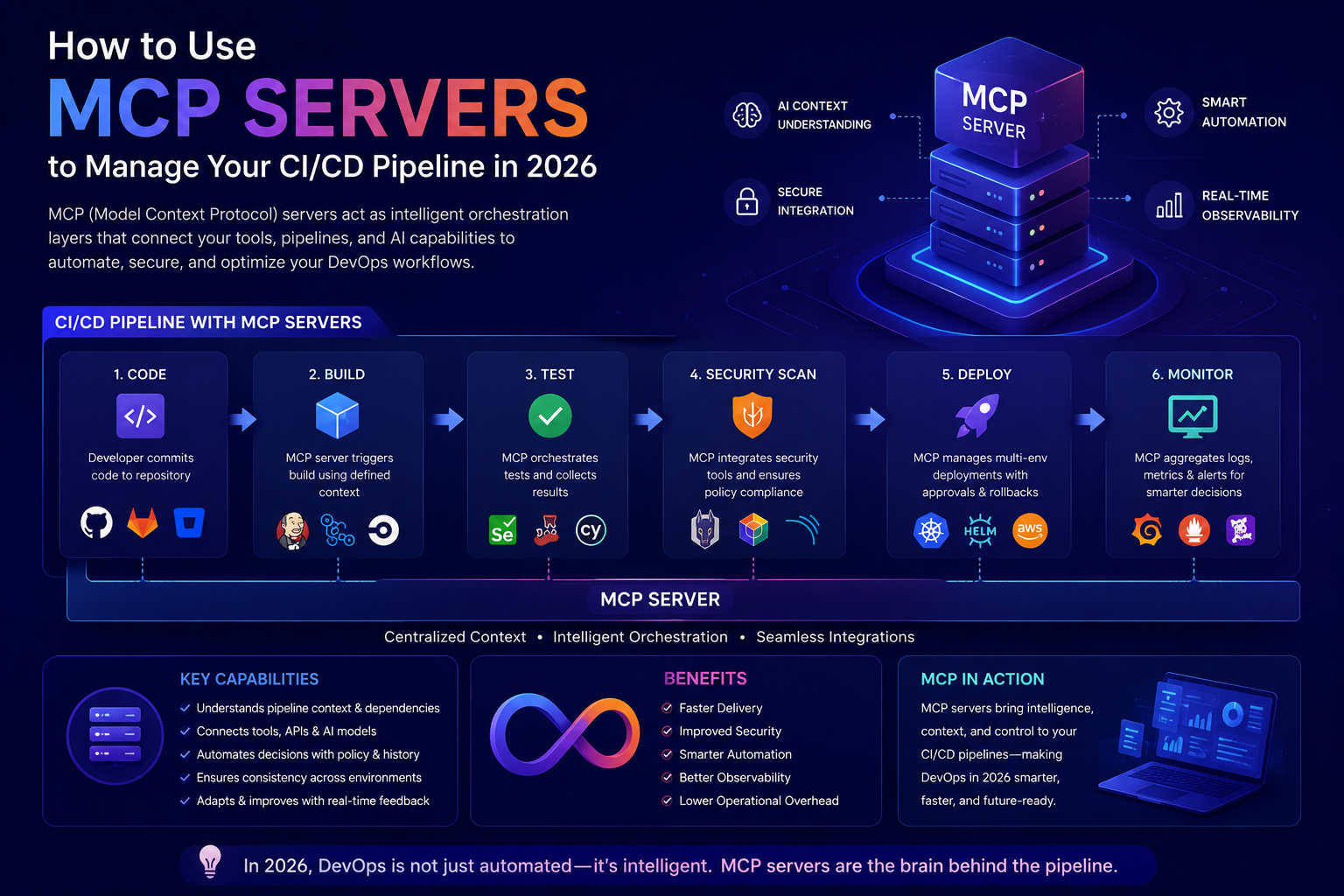
What Is an MCP Server, and Why Should DevOps Teams Care?
The Model Context Protocol (MCP) is an open standard that lets AI assistants connect to external tools and data sources through a consistent interface. Instead of building a custom integration every time you want an AI assistant to talk to Jenkins, GitHub Actions, or your deployment dashboard, an MCP server exposes those systems as a set of standardized "tools" the assistant can call.
For CI/CD, this is a genuine shift in workflow. Rather than switching between a terminal, a build dashboard, and a chat window to check on a deployment, engineers can ask an AI assistant connected via MCP: "Why did the staging build fail?" or "Roll back the last deploy to production" — and get a real answer backed by live pipeline data, not a guess from training data.
Why CI/CD Is a Natural Fit for MCP
CI/CD pipelines generate a constant stream of structured, high-signal data: build logs, test results, deployment statuses, commit history, infrastructure health. That's exactly the kind of context an AI assistant needs to be genuinely useful rather than generic. MCP gives that data a standard delivery mechanism, which unlocks a few concrete capabilities:
Natural-language pipeline queries — "What's the status of the release branch build?" instead of digging through a dashboard
Automated triage — the assistant reads failing build logs and surfaces the likely root cause before an engineer opens the console
Guided remediation — trigger a rollback, re-run a failed stage, or restart a stuck job through a conversational interface
Cross-tool correlation — connect pipeline failures to related tickets, recent commits, or infrastructure alerts in one conversation
Core Use Cases for MCP in a CI/CD Workflow
1. Build and Deployment Monitoring An MCP server exposing your CI/CD platform (Jenkins, GitHub Actions, GitLab CI, CircleCI) lets an assistant answer status questions directly, pulling live data instead of stale documentation.
2. Automated Failure Diagnosis When a build fails, the assistant can fetch logs through the MCP tool, summarize the likely cause, and suggest a fix — cutting the time between failure and root-cause identification from minutes to seconds.
3. Controlled Pipeline Actions With appropriate permissions, an assistant can trigger specific pipeline actions — re-running a stage, promoting a build to staging, or rolling back a deployment — while keeping a human in the loop for approval on production changes.
4. Release Notes and Changelog Generation MCP tools connected to your version control system let an assistant compile commit history into structured release notes automatically as part of the deployment workflow.
5. Incident Response Support During an active incident, an assistant with MCP access to deployment history, logs, and monitoring tools can quickly correlate a spike in errors with a recent deploy — accelerating the path to a fix.
How to Implement This: A Practical Roadmap
Step 1: Identify Your Highest-Value Integration Points Start with the pipeline stages that generate the most manual toil — usually build failure triage and deployment status checks. Don't try to wire up everything at once.
Step 2: Choose or Build the Right MCP Server Several CI/CD platforms and DevOps tool vendors are shipping official or community MCP servers. If yours doesn't have one yet, an MCP server can be built as a thin wrapper around your existing CI/CD API — most platforms already expose REST APIs that map cleanly to MCP tool definitions.
Step 3: Scope Permissions Carefully This is the step teams most often get wrong. Read-only access (status checks, log retrieval) is low risk and a good starting point. Write access (triggering deploys, rollbacks) should require explicit confirmation steps and be scoped to non-production environments first.
Step 4: Add Guardrails for Production Actions For anything touching production — deployments, rollbacks, infrastructure changes — require human approval before the action executes. MCP makes it easy to suggest an action; it should never be configured to silently execute high-risk changes.
Step 5: Test With Real Incidents, Not Just Demos The real value shows up during an actual build failure or deployment issue, not a scripted demo. Roll out to one team, gather feedback on false positives and blind spots in diagnosis, and iterate before expanding.
Security Considerations You Can't Skip
Least privilege by default — the MCP server should only expose the specific actions a workflow genuinely needs, not full API access
Audit logging — every action taken through the MCP server should be logged and attributable, just like a human-triggered pipeline action
Secrets stay out of the conversation — API keys and credentials should be handled server-side, never passed through the assistant's context
Environment isolation — keep MCP-driven actions in staging/non-production until trust and track record are established
The Bottom Line
MCP servers turn CI/CD pipelines from something engineers have to actively monitor into something they can converse with — cutting the time between a failure occurring and a fix being deployed. The teams getting the most value aren't trying to automate everything on day one; they're starting with monitoring and diagnosis, proving the value, and expanding into controlled automation from there.
Want help designing an MCP-driven DevOps workflow for your pipeline? We help engineering teams identify the right integration points, scope permissions safely, and roll out AI-assisted CI/CD without adding risk to production